Quick answer: Many commercial direct-view LED products publish lifetime ratings around 100,000 hours, but that number commonly means time to about half of the original brightness under stated conditions—not the date when the entire wall suddenly turns black. At 12 hours per day, 100,000 operating hours is about 22.8 years; at 24 hours per day, it is about 11.4 years. The useful life of a real video wall can be shorter or longer because heat, brightness, content, power, environment, component failures, calibration and the owner’s image-quality threshold all matter.
A lifetime number is useful only after you read its definition. An LED video wall is a system of LED packages, modules, power supplies, receiving cards, controllers, cables, cooling paths and mounting hardware. Those parts do not age at the same rate. A wall may still display an image after years of service but no longer meet the brightness, color-uniformity or uptime standard required by a broadcast studio, control room, lobby or retail installation.
This guide explains how to translate an LED lifetime specification into a planning estimate. It does not promise a universal replacement date. For procurement, use the current specification, warranty and operating limits for the exact model being installed.
The short answer
For initial budgeting, start with the manufacturer’s rated LED life and its test definition. Then calculate annual operating hours and add a service plan for the rest of the system. Do not divide a headline number by 8,760 and call the result a guaranteed project life.
| Term | What it can mean | What it does not prove |
|---|---|---|
| LED lifetime | A stated operating-hour point, often tied to a brightness threshold | That every pixel and electronic component will work until that hour |
| Half brightness | Light output has declined to about half of the defined starting value | That the screen is completely dark or automatically unusable |
| 24/7 duty cycle | The product is specified for continuous operation | That maintenance, cleaning, calibration and component service are unnecessary |
| Warranty period | The manufacturer’s contractual coverage under stated terms | That rated LED life and warranty length are the same number |
| Useful life | The period during which the installed system meets the owner’s requirements | A universal value shared by every venue and application |
What 100,000 hours actually means
Samsung’s explanation of LED longevity makes the same distinction: the familiar 100,000-hour figure describes degradation toward half brightness rather than a completely dark display. Samsung also warns that the diode is only one part of the system. Heat, power, cabinet design, airflow and displayed content influence the practical result.
Two details therefore belong in every comparison. First, confirm whether the rating is typical, minimum, maximum or “up to.” Second, confirm whether it is measured to half brightness, another light-output threshold, or a different endpoint. Product families can publish different figures, so a value from one brochure should not be transferred to another wall.
Planning rule: Keep the exact specification page, revision date and lifetime definition in the project record. A salesperson’s rounded “about ten years” statement is not a substitute for the model-specific document.
Convert operating hours into calendar years
The arithmetic is simple, but the interpretation is not. Divide the rated operating hours by the wall’s planned hours per day and by 365. The table below converts 100,000 hours without claiming that the wall will meet your image standard for the full period.
| Schedule | Hours per year | 100,000 hours equals | Planning caution |
|---|---|---|---|
| 8 hours/day | 2,920 | About 34.2 years | Other components, product support and image requirements may become limiting much earlier |
| 12 hours/day | 4,380 | About 22.8 years | Brightness setting, ambient heat and content still affect aging |
| 16 hours/day | 5,840 | About 17.1 years | Allow for maintenance downtime and system refreshes |
| 24 hours/day | 8,760 | About 11.4 years | Continuous operation increases exposure to heat and component wear |
Use actual controller logs when possible. Scheduled hours are not the same as powered hours, and a display left on with a black image may still keep processors, power supplies and cooling systems active. For an existing wall, measured operating history is stronger evidence than an old estimate.
The wall is more than its LEDs
A video wall can require service long before its LED packages reach a stated half-brightness point. Power supplies experience electrical and thermal stress. Fans, where present, are mechanical parts. Receiving cards, data paths, controllers and connectors can fail or become unsupported. Cabinet alignment and module calibration can also affect whether the wall remains acceptable as one continuous image.
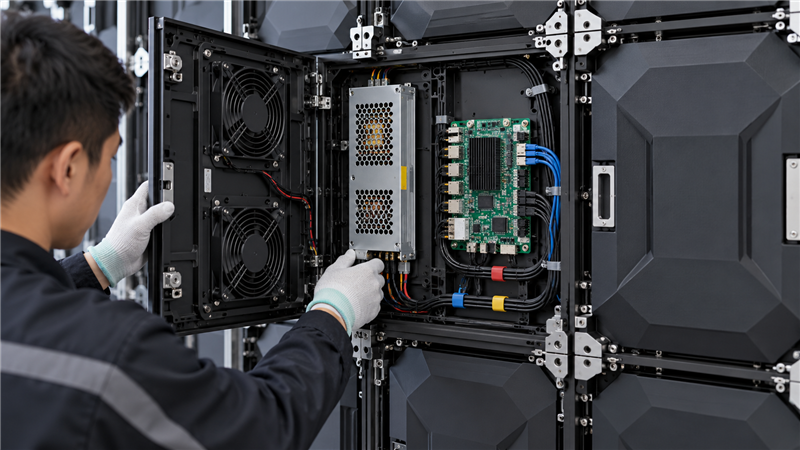
This is why serviceability matters at purchase. Record front or rear access, spare-module strategy, controller compatibility, power redundancy, calibration-data handling and the time required to reach common components. A nominally long-lived display can become economically obsolete if replacement modules are unavailable or cannot be matched visually.
Do not confuse product warranty with useful life. A warranty defines contractual remedies and exclusions for a stated period. Rated LED life describes a performance endpoint under stated conditions. Procurement should compare both, along with spare availability and support terms.
What shortens useful life
- High operating temperature. Blocked airflow, high ambient heat and undersized thermal design add stress to LEDs and electronics.
- Running brighter than the room needs. Higher drive levels create more heat and can accelerate light-output decline.
- Static or uneven content. Frequently used bright regions can age differently from dark regions. See the separate guide to LED display burn-in and uneven aging.
- Dust and contaminated cooling paths. Dirt can impair airflow and make inspection harder. Use the model-approved method in our LED screen cleaning guide.
- Poor power conditions. Voltage events, loose connections and overloaded circuits can affect supplies and control electronics.
- Moisture or unsuitable environment. Indoor and outdoor ratings, humidity limits and condensation controls must match the site.
- No measurement baseline. Without starting brightness, color and uniformity records, gradual decline is hard to distinguish from a setup problem.
How to extend serviceable life
Maintenance cannot make an LED package new again, but it can prevent avoidable stress, find failing components early and preserve consistent output. Planar’s maintenance document lists tasks such as checking environmental operation, inspecting alignment, adjusting brightness and color, reviewing error logs, cleaning serviceable parts and filters, and replacing modules when needed.
- Establish a commissioning baseline. Record brightness, color temperature, uniformity, controller configuration, ambient temperature and representative power use.
- Use an application-appropriate brightness policy. Set enough output for the environment instead of defaulting to maximum.
- Protect airflow and operating conditions. Keep vents and service spaces clear and investigate temperature alarms rather than resetting them without a cause.
- Review logs and test patterns. Look for recurring module, receiving-card, communication and power events.
- Maintain matched spares. Store modules under approved conditions and preserve calibration data and batch information.
- Inspect power components. Use the LED display power-supply maintenance checklist within the site’s electrical-safety rules.
- Record every intervention. Note the date, symptom, measurements, part replaced and post-service verification.
A consistent program matters more than an arbitrary monthly checklist. The interval should reflect operating hours, environment, criticality and manufacturer instructions. Our broader P3 LED display maintenance checklist can help structure the record, but the installed model’s manual remains the controlling source.
Plan replacement before the wall fails
A useful replacement trigger is not “the first pixel failed.” Individual modules or power supplies may be serviceable. Conversely, a wall may need a planned refresh while it still turns on because it no longer meets a required brightness, color, uptime, serviceability or compatibility target.
Set thresholds before performance declines:
- minimum calibrated brightness for the room and content;
- acceptable cabinet-to-cabinet brightness and color variation;
- maximum recurring fault rate or unplanned downtime;
- availability of matched modules, supplies and controller support;
- energy and cooling cost compared with a supported replacement;
- business risk during a critical event or control-room operation.
Review those thresholds annually and after any major component or content-policy change. A staged replacement plan can include spare consumption, controller modernization, module refresh or a full wall replacement. The correct choice depends on measured condition and supportability, not just age.
Questions about LED video wall lifespan
Does 100,000 hours mean an LED wall will work for 11 years?
Not as a guarantee. At continuous 24-hour operation, 100,000 hours is about 11.4 calendar years, but the rating may refer to half brightness and may cover the LED packages rather than every system component. Check the exact model definition, operating conditions, warranty and service history.
Do LED video walls burn out all at once?
Usually not. Light output can decline gradually, while individual modules, pixels, power supplies, receiving cards or cables may require service at different times. Uniformity and supportability can become limiting before the whole wall goes dark.
Can maintenance extend an LED wall’s life?
Maintenance can reduce avoidable thermal, contamination and connection problems and can preserve uptime through inspection and component replacement. It cannot reverse LED aging or add a guaranteed number of hours.
When should an LED video wall be replaced?
Replace or refresh it when measured brightness, uniformity, reliability, compatibility or parts support no longer meets the owner’s defined requirement and repair is no longer the practical choice. Set those thresholds before failure.
Sources and limits
Samsung: The truth about LED lifespan — interpretation of the common rating and discussion of heat, power, design and content.
Planar Service Maintenance Plan — examples of whole-system inspection and maintenance activities.
These sources illustrate definitions and maintenance factors. They do not establish the life or warranty of a different product. Always use the current documents for the installed model.