Before shipping an LED display overseas, agree the model-specific packing and handling instructions, match each package to an itemized packing list, and keep dated dispatch evidence. At arrival, record external condition before unpacking, check the contents by package ID, and separate damage, shortages and later commissioning faults.
For an indoor P3 display order, the receiving task involves more than counting boxes. Cabinets, controllers, cables and agreed spares may arrive in different packages. Your records should let the receiving team identify what belongs in each one. This guide provides a buyer-side checklist; the actual packing specification, transport terms and reporting procedure must come from the supplier and the service booked.
Agree the packing checklist before dispatch
Ask for the packing plan while changes can still be made. Match it to the exact cabinet model and the handling route, including unloading and movement to the installation area. The supplier should identify the approved protection and handling instructions for those products. Do not choose a foam thickness, stack limit or crate layout from a generic article.
| Record to request | Question it should answer |
|---|---|
| Package identity | Which package ID contains which cabinets or accessories, and what quantities were packed? |
| Packing and handling instructions | What protects the display faces and corners? What orientation and handling limits apply to this model? |
| Shipment details | What are the packed dimensions, gross weights, package count and shipment reference? |
| Receiving arrangements | Who receives, photographs and checks the order, and who handles discrepancies with the supplier and carrier? |
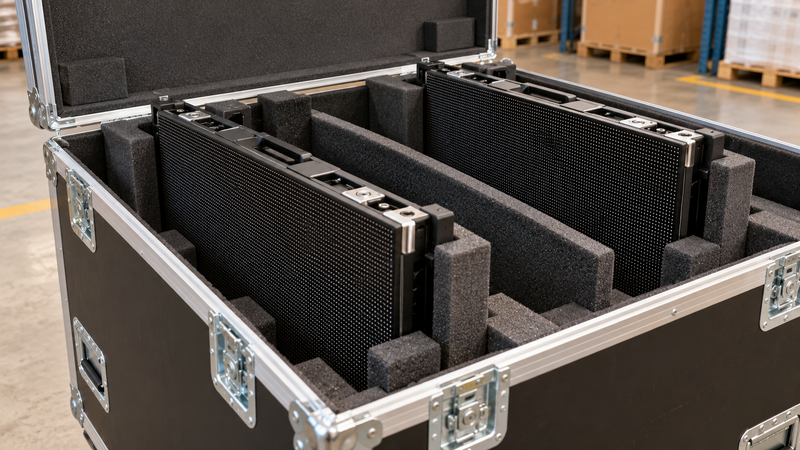
Product-specific protection matters. For example, Unilumin’s current Upad IV product page describes a flight case and foam protection for cabinet corners and surfaces. That is an example for its named rental product, not a packing specification for an LEDP3 order.
Ask for package-level dispatch evidence
A wide photograph of several sealed cases shows little about their contents. Request a small, organized set of images: the items before closure, their protection inside each package, and the closed package with its ID visible. Keep the packing-list revision alongside those images. If the supplier provides serial numbers, connect them to the relevant package.
For accessories, describe the items precisely enough to count them later. “Cables included” is less useful than a list of the agreed cable types and quantities. Record separately packed controllers, installation accessories and spares against the confirmed order. This is an inventory task, rather than a reason to add unrequested equipment.
Keep factory test evidence in its own folder and identify the equipment it covers. A test video and a packing photograph answer different questions. Neither, by itself, proves what happened during transport. If you are still resolving the screen configuration, our P3.91 LED screen specification guide addresses that earlier decision.
Inspect the delivery before moving into installation
Prepare a place to receive and document the shipment. Before opening packages, photograph their overall condition, identifiers and any visible impact marks, broken closures or wet areas. Compare the delivered package count with the shipment documents. Follow the carrier’s procedure for recording an exception and contact the nominated supplier or freight representative promptly when something is wrong.
Unpack according to the applicable instructions and retain the protective materials while an issue is being assessed. Link the contents to the package ID as you check them. Record visible cabinet or connector damage without turning the receiving check into an improvised repair or power-on test. If equipment is wet or visibly damaged, leave it unpowered and ask the responsible technician or supplier for instructions.
An arrival record should link the shipment reference, package ID, external condition, contents and observed discrepancy. A delivery receipt records a handover; the later commissioning record addresses the assembled display. Keep those stages separately documented.

Separate damage, shortages and commissioning issues
Describe the observation before deciding its cause. “The corner of case C04 is crushed” is an external-package observation. “Cabinet serial number X has a bent connector” describes an item. “One controller is absent from the checked contents” is a shortage. Each needs its own supporting record, even when several observations concern the same shipment.
A display fault discovered during authorized commissioning belongs in a further test record. Include the cabinet identity, observed symptom, test conditions and steps already taken. Do not describe it as proven freight damage simply because it was found after delivery. Give the supplier the evidence needed to investigate.
Manufacturer procedures also differ. A Planar document dated November 2019 asks recipients of replacement products to inspect packaging and materials and report shipping damage promptly. This historical example does not establish current LEDP3 warranty coverage or a universal reporting deadline.
Build one discrepancy record that can be followed
Consider this illustrative receiving note: “Order A17, package C04; one corner visibly dented before opening; photographs 01–03 show the package and label; the packing list assigns two cabinets to C04; two cabinets received, one with a visibly bent rear connector.” It distinguishes an impact mark, the expected count, the actual count and an item-level observation. It makes no unsupported claim about when the connector was damaged.
Add the observation date, receiver’s name, relevant item or serial identifiers and the contact already notified. Attach the packing list, shipment document and original photographs together. Keep later instructions and any authorized inspection or repair report in the same file, so a second person can follow the case without reconstructing it from scattered messages.
The DHL Aviation Cargo claims guide illustrates why shipment identification and supporting paperwork matter: its checklists request affected-piece details, waybill information, invoices, packing lists and supporting documents such as photos. Requirements depend on the carrier and service. Confirm the applicable procedure, reporting time limits and authorized claimant; a photo set alone does not guarantee a claim will be accepted.
Before purchase, identify in writing who handles delivery exceptions, which documents each party must provide, and which carrier or insurer procedure applies.

Questions about overseas LED display shipments
Does a clean outer package prove that the display is undamaged?
No. Record the external condition, then inspect and count the contents using the applicable unpacking instructions. A clean exterior does not replace the item check or authorized commissioning.
Can I copy another LED model’s packing specification?
Use it to frame questions, rather than as approval for your shipment. Obtain the packing, support and handling requirements for the exact model and route from the responsible supplier.
Should I wait for installation before reporting a missing item?
Report the observed shortage promptly through the agreed process, identifying the package and packing-list entry. Do not postpone a known discrepancy while waiting for a later installation test.
Is shipping damage automatically covered by the product warranty?
Do not assume coverage. Product warranty, carriage terms and any cargo insurance have their own conditions. Ask the responsible parties which procedure applies and preserve the requested evidence.