A list of 16 by 9 screen sizes is useful only when every number means the same thing. A television or monitor is commonly sold by the diagonal of its viewable image, while an architect needs width and height and an LED engineer needs cabinet count and native pixel resolution. Those are related measurements, but they are not interchangeable.
This guide first converts a 16:9 diagonal into active width and height. It then shows the extra checks required for direct-view LED. That distinction prevents a common purchasing error: choosing a familiar diagonal, assuming it equals the finished installation opening, and discovering later that the selected cabinets, frame, trim or service method do not fit.
The quick calculation
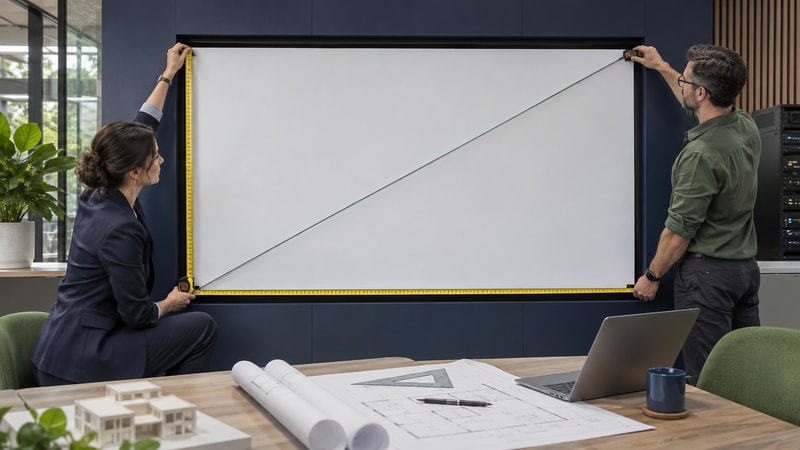
A 16:9 rectangle is 16 equal units wide and 9 units high. The diagonal is the square root of 16 squared plus 9 squared, or the square root of 337. This gives two practical multipliers:
Active height = diagonal × 9 ÷ √337 ≈ diagonal × 0.4903
Use the same unit throughout. If the diagonal is in inches, the result is in inches. Multiply inches by 25.4 for millimetres, or by 0.0254 for metres. HP’s display guidance makes an important boundary clear: marketed diagonal is measured across the viewable screen and normally excludes the bezel, frame and stand. An LED wall also needs structure, trim, cabling, ventilation and sometimes front or rear service space.
Common 16:9 screen dimensions
| Diagonal | Active width | Active height | Approx. metric active area |
|---|---|---|---|
| 55 in | 47.9 in | 27.0 in | 1.218 × 0.685 m |
| 65 in | 56.7 in | 31.9 in | 1.439 × 0.809 m |
| 75 in | 65.4 in | 36.8 in | 1.660 × 0.934 m |
| 85 in | 74.1 in | 41.7 in | 1.882 × 1.058 m |
| 100 in | 87.2 in | 49.0 in | 2.214 × 1.245 m |
| 120 in | 104.6 in | 58.8 in | 2.657 × 1.494 m |
| 150 in | 130.7 in | 73.5 in | 3.321 × 1.868 m |
| 200 in | 174.3 in | 98.1 in | 4.428 × 2.491 m |
| 220 in | 191.7 in | 107.9 in | 4.870 × 2.740 m |
These values are rounded planning dimensions for the active image. They are not product drawings. Two products with the same marketed diagonal can have different overall dimensions because the frame, enclosure, mounting and service architecture differ. Before construction, use the exact supplier drawing rather than adding an assumed border to this table.
Why an LED wall is different
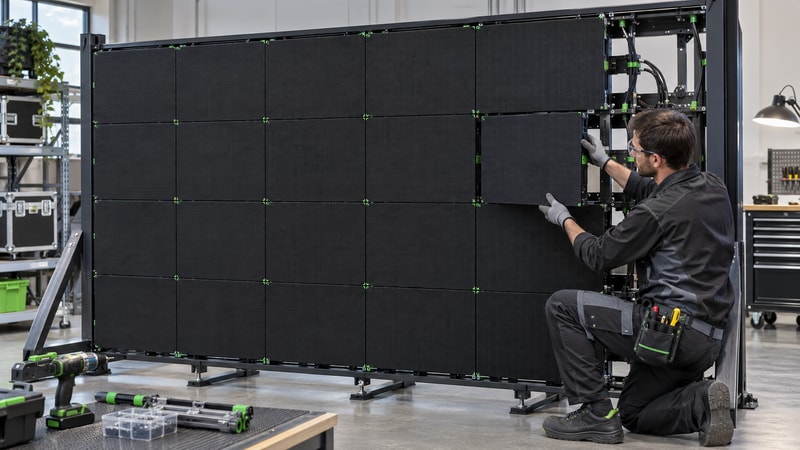
A flat panel arrives as one fixed display. A direct-view LED wall is assembled from modules and cabinets. Its finished active width must be a valid number of cabinet columns, and its height must be a valid number of cabinet rows. The nearest buildable size may therefore be slightly larger or smaller than the theoretical diagonal conversion.
A wall made with 600 × 337.5 mm cabinets preserves 16:9 at the cabinet level. A square 500 × 500 mm cabinet can also make a 16:9 wall, but only certain column-and-row combinations match the ratio exactly. A 16-column by 9-row grid is 8.0 × 4.5 metres. A smaller 7 × 4 grid is 3.5 × 2.0 metres, which is close to 16:9 but not exact. The processor must then scale, crop or letterbox a standard 16:9 source according to the approved content plan.
Turn a target size into a buildable cabinet grid
- Record the maximum active opening. Separate image area from trim, structure, ventilation, cable routes and service space.
- Choose a released cabinet format. Obtain its exact physical dimensions and pixel matrix from the product data sheet.
- Calculate possible columns and rows. Divide the available width and height by cabinet width and height, then round only to complete cabinets.
- Check the resulting ratio. Divide finished active width by height and compare it with 16 ÷ 9, approximately 1.7778.
- Calculate native pixels. Multiply cabinet columns by horizontal pixels per cabinet, and rows by vertical pixels per cabinet.
- Freeze the cabinet map. Confirm seams, power and data topology, spare strategy, structure and service access before fabrication.
For example, five 960 × 540 mm 16:9 cabinets across and five high create a 4.80 × 2.70 m active wall. The same physical size can have different native resolution when the selected cabinet has a different pixel pitch and pixel matrix. Uniview LED’s published engineering example shows that a 2.5 mm version can form 1920 × 1080 while a 1.25 mm version at the same physical size can form 3840 × 2160. Physical ratio and native resolution are separate decisions.
Check resolution and content mapping
“16:9” describes shape, not pixel count. Full HD at 1920 × 1080 and 4K UHD at 3840 × 2160 are both 16:9, but so are many other pixel canvases. For LED, the commissioning resolution comes from the cabinet grid multiplied by the released pixel matrix per cabinet.
An early estimate can divide active width and height in millimetres by pixel pitch. This is useful for testing whether a target is plausible. It is not the final specification because real walls use complete cabinets and modules. The LED display matrix guide explains why row and column counts must match the actual product architecture.
Ask the processor and content teams to confirm the native canvas, input format, scaling method, crop or letterbox rule, frame rate, total pixel load and output-port map. A 1920 × 1080 source may be acceptable on a non-1080 wall when the approved processor scales it well, but do not promise pixel-for-pixel reproduction unless the cabinet map proves it.
Check room fit before ordering
Screen geometry is only one part of room planning. Texas Instruments’ classroom study shows why viewing distance and user task belong in the size decision. A room used for detailed spreadsheets, maps or small text may need a larger image height or higher native pixel density than a room used for logos and large video. Use the applicable AV design standard and test the actual content from the farthest and closest regular seats.
| Check | What to obtain | Common mistake |
|---|---|---|
| Architecture | Active opening, finished wall depth, trim, load path and tolerances. | Treating active width as the complete installation width. |
| Viewing | Closest and farthest regular viewers, content detail and camera positions. | Selecting diagonal from room length alone. |
| LED product | Cabinet dimensions, pixels per cabinet, pitch, service direction and weight. | Rounding a target size without checking complete cabinets. |
| Signal | Native canvas, input resolution, scaling, frame rate and processor capacity. | Assuming every 16:9 wall is natively 1080p or 4K. |
| Operations | Power, heat load, ventilation, access, spare modules and calibration method. | Approving only the visible rectangle. |
For meeting rooms, combine this calculation with the conference-room LED screen checklist. If you are comparing fine-pitch options, the P3.91 LED screen guide also shows why pitch, viewing need and service conditions should be specified together.
Questions about 16:9 screen sizes
How wide is a 100-inch 16:9 screen?
The active image is approximately 87.2 inches wide and 49.0 inches high, or 2.214 × 1.245 metres. The product’s total dimensions will be larger once its enclosure, trim, structure and service requirements are included.
Is 1920 by 1080 always the right resolution for a 16:9 LED wall?
No. 1920 × 1080 is a 16:9 pixel canvas, but a modular LED wall’s native resolution comes from cabinet columns and rows multiplied by the exact pixels per cabinet. The processor can map a 1080p source to another native canvas, subject to the approved scaling plan.
Can square LED cabinets make a 16:9 wall?
Yes. With square cabinets, a 16-column by 9-row grid is exactly 16:9. Other grids may be close but not exact. Check the finished ratio, native pixels and content mapping instead of describing every wide wall as 16:9.
Does screen size include the frame or mounting structure?
Usually not when a screen is described by its viewable diagonal. For procurement, request both active display dimensions and complete installed dimensions, including frame, trim, mounting depth, ventilation and service clearance.
Sources and limits
- HP: how monitor size is measured
- Texas Instruments: determining minimum display size for classroom settings
- Uniview LED: physical size, pitch and cabinet-based native resolution
Boundary: The table is a rounded geometric reference for a theoretical active 16:9 rectangle. It is not a model quotation, structural design or universal viewing-distance standard. Confirm the exact product drawing, cabinet map, native resolution, processor plan, structural loads, electrical design, heat load, service access and local installation requirements before ordering.